


-21%
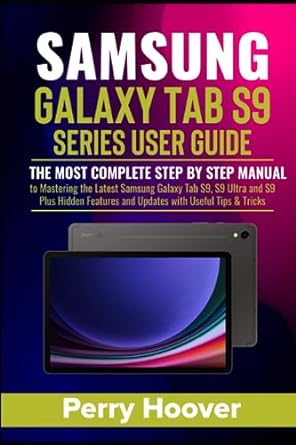
Samsung Galaxy Tab S9 Series User Guide: The Most Complete Step by Step Manual to Mastering the Latest Samsung Galaxy Tab S9, S9 Ultra and S9 Plus Hidden Features and Updates with Useful Tips & Tricks
$24.56 Save:$6.00(21%)
Available in stock
| Print length: | 252 pages |
|---|---|
| Language: | English |
| Publication date: | 29 August 2023 |
| Dimensions: | 15.24 x 1.45 x 22.86 cm |
| ISBN-13: | 979-8859550739 |
People Also Viewed
-
 Based on a True Story: Not a Memoir
$30.30
Based on a True Story: Not a Memoir
$30.30
-
 The Master Guide to Drawing Anime: How to Draw Original Characters from Simple Templates: 1
$25.21
The Master Guide to Drawing Anime: How to Draw Original Characters from Simple Templates: 1
$25.21
-
 Food & Drink: Coloring Book with Easy and Bold Designs for Adults, Beginners, and Kids, Simple Illustrations of Food, Snacks, Desserts, Fruits, and Many More to Relax and Boost Creativity
$12.64
Food & Drink: Coloring Book with Easy and Bold Designs for Adults, Beginners, and Kids, Simple Illustrations of Food, Snacks, Desserts, Fruits, and Many More to Relax and Boost Creativity
$12.64
Additional information
| Format | Paperback |
|---|
Description
Do you feel like you haven’t fully utilized the potential of your Samsung Galaxy Tab S9, S9+ , or S9 Ultra ? You don’t have to search anymore! Get ready to embark on an exciting journey with this in-depth user guide designed for beginners and experienced users, to help you make the most of your powerful gadget. This user-friendly guide, included in the book, will teach you everything you need to confidently set up and master your new Samsung Galaxy S9 series . You’ll be a pro in no time if you follow our experts’ advice and clear, step-by-step instructions. Get a glimpse of what’s in store for you with this preview: What’s new about this device How to turn on your Tab S9 Series for the First time Ways to transfer your content Content that can and cannot be transferred with Smart Switch Smart Switch Settings How to download themes How to change your theme How to download icons How to change icons How to delete themes How to delete icons How to recover purchased themes How to use color palette options How to customize your font size and style Enable Screen Zoom How to turn on Full Screen apps Adjust color settings How to use Easy Mode Adjust your screen brightness How to make streaming videos look best Additional video settings How to use button combinations How to use Palm swipe How to use voice to take screenshot How to use S pen to take screenshot How to use Tasks Edge panels How to use scroll capture to capture more than one screen How to view screenshots How to share screenshots Additional options How to view compatible accessories How to add an accessory How to manage connected app permissions How to manage Services How to connect Samsung Health app and TV app Turn Gallery Auto Sync on or off Sync specific albums in Gallery Download photos and videos from OneDrive Delete Gallery files from OneDrive Restore deleted Gallery files from OneDrive How does the S pen work Explore the S pen features in Air command menu How to draw Samsung tab S9 Take advantage of the large display to maximize multitasking Mark up documents and control your tablet with the S Pen See it all at a glance with Multi-View Windows Add the 2-in-1 Book Cover for laptop-like productivity Use Samsung DeX, wired or wirelessly, on an external display Connect to higher-quality video calls more quickly How to Download apps How to Uninstall apps How to Disable preloaded apps How to See which apps you’ve used recently How to Reinstall paid apps and themes How to Hide and unhide apps How to Manage app permissions How to Change the default apps How to Check for app updates How to Move apps to a microSD card Mobile Hotspot and Tethering More connection settings Security and Privacy Fingerprint scanner problem And many more… So what are you waiting for? Scroll up and Click the Orange – BUY NOW WITH 1-CLICK BUTTON- on the top right corner and Download Now!!! You won’t regret you did See you inside!!! —- ISBN: 9798859550739 | ISBN10: B0CGYRBKYQ | ISBN-13: 979-8859550739
Reviews (0)
Only logged in customers who have purchased this product may leave a review.





Reviews
There are no reviews yet.